


2026 Warehouse Forklift Tablet Buying Guide: How to Choose the Right Forklift Tablet for Warehouse Operations
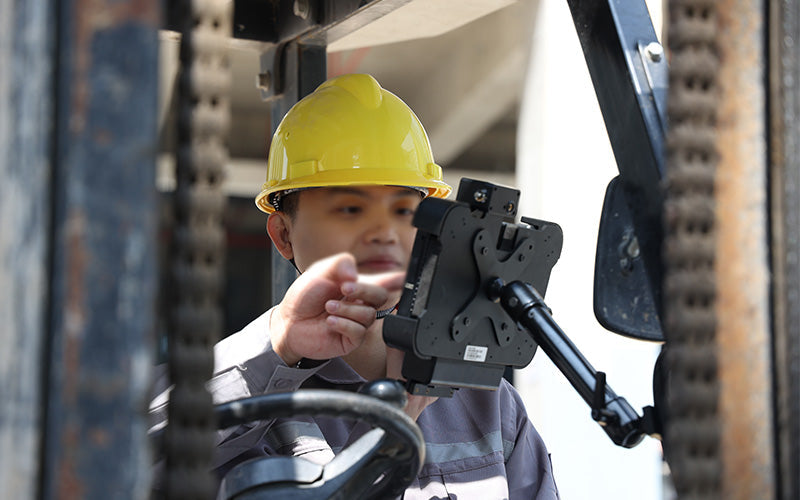
In today’s digital warehouse era, both consumer tablets and rugged tablets are commonly seen across warehouse operations. For forklift deployments, rugged tablets connected to vehicle mounts through Pogo Pin docking interfaces offer a simpler, more efficient, and more reliable solution compared with consumer tablets.
For businesses planning long-term deployment, rugged forklift tablets often provide greater stability while helping improve efficiency and reduce operational costs.

Why Consumer Tablets Are Not Ideal for Warehouse Forklift Environments
Forklift operating environments are completely different from ordinary office scenarios.
Devices installed on forklifts face daily challenges such as:
- Continuous vibration
- Warehouse dust exposure
- Frequent forklift starts and stops
- Temperature fluctuations inside warehouses
- Long hours of continuous operation
- High-frequency barcode scanning workflows
Many companies initially choose consumer tablets to reduce upfront costs. However, after a period of real-world deployment, common issues often begin to appear:
- Loose charging ports
- Mount instability or bracket failures
- Cracked screens
- Battery life degradation
- Unstable Wi-Fi connectivity
- Reduced scanning efficiency
As a result, more warehouses are shifting toward Forklift Tablets or Vehicle Mounted Tablets designed specifically for industrial and warehouse environments.
Key Features to Consider When Choosing a Forklift Tablet
1. Vehicle Mounting System Compatibility (Vehicle Mount)
Many companies focus only on hardware specifications when selecting a tablet but overlook the mounting system.
In reality, mount stability is often more important than processor performance.
Common installation locations include:
- Forklift cabins
- Reach trucks
- Pallet stackers
- AGVs (Automated Guided Vehicles)
- Warehouse transport vehicles
Common mounting solutions include:
- Vehicle Dock (vehicle mounting dock)
- RAM Mount brackets
- Quick-release docks
- VESA mounting holes
A stable mounting solution not only reduces vibration but also helps prevent accidental drops during operation.
2. Vibration and Shock Resistance
Forklifts operate under constant vibration throughout the workday.
This is especially noticeable in environments such as:
- High-bay warehouses
- Loading docks
- Floor expansion joints
- Outdoor loading areas
Continuous vibration can significantly affect device lifespan.
Recommended features include:
- MIL-STD-810H certification
- Shock-resistant construction
- Reinforced corners
- Vehicle vibration-resistant design
One issue many warehouses overlook is:
Connector lifespan.
Long-term vibration may lead to:
- Loose USB ports
- Charging connection failures
- Damaged cables
For this reason, vehicle deployments are better paired with Pogo Pin vehicle docks, reducing connector wear caused by repeated plugging and unplugging.
3. WMS Compatibility
Forklift tablets have essentially become mobile WMS terminals.
Common warehouse systems include:
- SAP EWM
- Oracle WMS
- Manhattan WMS
- Odoo Inventory
- Zoho Inventory
- ERP warehouse modules
Typical warehouse workflow:
Receiving → Putaway → Picking → Inventory → Shipping
Recommended device capabilities:
- Real-time synchronization
- Barcode input support
- Wi-Fi roaming
- ERP integration
For large warehouses, Wi-Fi handoff speed can directly impact operational efficiency.
4. Barcode Scanning Capability
Warehouse forklift operations rely heavily on barcode scanning.
Typical scanning targets include:
- Location labels
- Pallet labels
- Shipping labels
- SKU labels
- Inventory codes
Recommended configuration:
- 1D / 2D barcode support
- Long-range scanning
- Integrated barcode scanner
- Bluetooth scanner compatibility
For high-rack warehouses, long-range scanning becomes especially important.
It can reduce the need for operators to repeatedly get on and off forklifts, improving picking efficiency.
5. Fleet Management and Connectivity
Modern warehouses are rapidly moving toward digital operations.
Forklift devices are increasingly connected to:
- Fleet management systems
- Asset management platforms
- Operational analytics systems
- Workforce management systems
- Route optimization tools
Recommended connectivity options:
- Wi-Fi 6 / 6E
- Bluetooth 5.x
- 4G LTE
- GPS (for outdoor environments)
Typical applications include:
- Forklift positioning and tracking
- Driver management
- Route tracking
- Outdoor logistics yard operations
- Asset monitoring
2026 Forklift Tablet Specifications
| Feature | Recommended Configuration |
| Display | 8–10 inch |
| Brightness | 700–1000 nits |
| Protection | IP65 minimum |
| Durability | MIL-STD-810H |
| Mounting | Vehicle dock / VESA |
| Connectivity | Wi-Fi 6 + Bluetooth |
| Optional | Barcode scanner / Pogo pin interface Vehicle Mount |
Conclusion
Choosing a forklift tablet PC involves more than just screen size or processor performance.
For warehouse operations, factors such as system installation, shock resistance, barcode workflows, and WMS integration typically have a greater impact on long-term efficiency.
As warehouses continue to evolve towards digital inventory and intelligent logistics, forklift tablet PCs are becoming a core tool for modern warehouse operations.



Leave a comment
This site is protected by hCaptcha and the hCaptcha Privacy Policy and Terms of Service apply.