
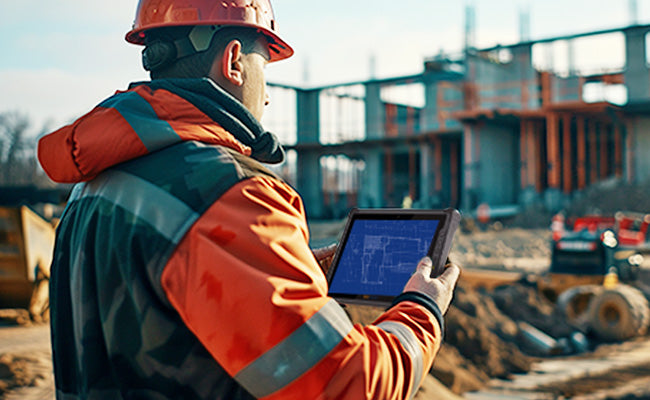

![9 Best Rugged Tablet Brands for Warehousing & Field Work [2026 Guide]](http://store.onerugged.com/cdn/shop/articles/IMG20260408152220_a5aba1e9-8a97-4d1e-9b2e-4171a9ca4736.jpg?v=1778995349&width=3072)
9 Best Rugged Tablet Brands for Warehousing & Field Work [2026 Guide]
A Real-World Buying Guide for Construction, Warehousing, Logistics & Field Work
Here's something most companies learn the hard way: your regular tablets are going to die in the field. It's not a question of if — it's when.
A consumer tablet may work perfectly fine inside an office. But place that same device inside a forklift, on a dusty construction site, or in the back of a service truck during summer — and problems show up fast.
Screens become unreadable in sunlight. Batteries drain before shifts end. Vibration loosens charging ports. One drop onto concrete suddenly turns into an expensive replacement cycle.
That's why industries like:warehousing,logistics,manufacturing,construction,utilities,GIS surveying,public safety,continue moving toward rugged tablet deployment in 2026.
But choosing the "best" rugged tablet brand is no longer just about durability.
Enterprise buyers now care more about:
- deployment reliability
- barcode scanning performance
- battery swap workflow
- docking compatibility
- sunlight visibility
- long-term support cost
After reviewing industrial deployment trends, enterprise mobility discussions, warehouse workflows, and field-service use cases, these are the rugged tablet brands most commonly trusted in real-world operations today.
1. Panasonic Toughbook-Still the Standard for Government & Heavy Industry
Panasonic Toughbook devices remain extremely common in:utilities,defense,aviation,oil & gas,railway infrastructure,government fleets,One reason is lifecycle stability.
Many enterprise buyers don't want to replace an entire hardware ecosystem every few years. Panasonic's modular design allows companies to swap scanners, ports, thermal modules, and accessories without replacing the full device.
For organizations running long deployment cycles, that matters more than flashy hardware specs.
The Toughbook G2 is especially popular in environments where:downtime is expensive,field reliability matters,Windows software compatibility is critical.The downside is obvious: pricing.
For smaller companies, Panasonic can become difficult to justify unless the environment is genuinely harsh enough to require that level of durability.But if you're not running a government fleet, Panasonic is probably overkill. That's where Getac comes in.
2. Getac-Built for Outdoor Field Operations & Emergency Fleets
If you've worked around emergency vehicles, utility crews, or outdoor inspection teams, there's a good chance you've already seen a Getac tablet in use.
Getac has built a strong reputation around:outdoor readability,vehicle deployment,hot-swappable batteries,harsh environment reliability.In field environments, screen brightness becomes a much bigger issue than many first-time buyers expect.
A tablet that looks perfectly fine indoors may become difficult to read once direct sunlight hits the display through a windshield or outdoor reflective surfaces.
That's why Getac devices commonly feature:1000+ nit displays,anti-glare coatings,glove-touch support,dual battery systems.For organizations operating across multiple shifts, battery swap workflow alone can significantly reduce downtime.
Getac is especially common in:utility field service,mining,public safety,construction inspection,outdoor engineering.The tradeoff is cost. These devices are designed for demanding deployment environments, not budget-conscious consumer use.
3. Dell Rugged-A Strong Choice for Windows-Based Enterprise Workflows
Dell Rugged tablets are often selected by companies already running Dell infrastructure internally.
For IT departments, this simplifies deployment because rugged devices can integrate into existing:Windows environments,security policies,device management systems,enterprise software workflows.This matters more than many buyers initially realize.
In large organizations, deployment complexity often becomes a bigger problem than hardware itself.
Dell rugged devices are commonly used alongside:Procore,Bluebeam,AutoCAD,BIM workflows,field reporting systems.Compared to Android rugged tablets, Dell devices are usually chosen when teams need full desktop-class Windows compatibility in the field.
Construction managers, engineers, and enterprise field teams often prioritize software compatibility over maximum ruggedness.
The downside is weight and pricing. High-performance Windows rugged tablets are rarely lightweight devices.
Now, if your CFO is watching the budget, skip Dell. Let's talk about what's actually scaling right now.
4. ONERugged-Growing Fast in Warehouse & Manufacturing Deployment
Over the past few years, ONERugged has become increasingly visible in:warehousing,manufacturing,vehicle-mounted deployment,logistics operations,MES environments.A major reason is deployment flexibility.
Many businesses need rugged hardware but simply cannot justify Panasonic- or Getac-level pricing when deploying dozens or hundreds of devices.That's where ONERugged has gained traction.
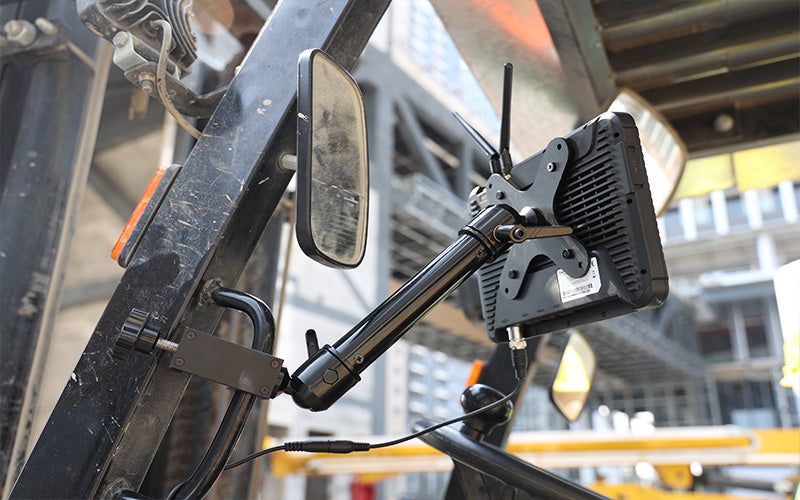
The company offers:Windows and Android options,integrated barcode scanning,vehicle mounting support,hot-swappable battery configurations,sunlight-readable displays,MIL-STD-810H durability.For warehouse operations and industrial mobility projects, the balance between durability and deployment cost becomes extremely important.
Many enterprise buyers eventually realize that large-scale deployment success depends less on chasing premium specs and more on:maintenance workflow,replacement cost,charging ecosystem,accessory compatibility,long-term scalability.That's the area where ONERugged has become increasingly competitive.

However, these devices are still better suited for light industrial deployment than extremely harsh environments like mining or heavy construction.
Samsung's great for field work. But if you're running a warehouse? There's really only one answer.
6. Zebra-The Warehouse & Barcode Scanning Specialist
2026 Rugged Tablet Core Brand Comparison Tablet
| Brand | System | Core Scenarios |
| Panasonic | Windows | Military/Heavy Industry/Aerospace |
| Getac | Win/Android | Public Safety/PoliceExpensive |
| Dell | Windows | Building Management/Enterprise Mobile Office |
| ONERugged | Win/Android | Smart Manufacturing/Warehousing/Vehicle |
| Samsung | Android | Site Inspection |
| Zebra | Android | Warehouse Inventory/Retail POS |
| Ulefone / Blackview / Oukitel | Android | Outdoor Adventure |
What Most Buyers Get Wrong About Rugged Tablets
I see IT directors make the same mistake year after year. They sit in a comfortable office, open a spreadsheet, and focus almost entirely on:IP ratings and drop certificates,CPU clock speeds,Who has the most RAM for the lowest price.
But out on the concrete floor, your workers don’t care about your spreadsheet. They care about reality. And in the real world, it’s the non-sexy specs that determine whether your deployment succeeds or fails.
Think about it: A rugged tablet that can survive a 2-meter drop is completely useless if the touchscreen glitches the moment a worker’s hands get sweaty. A fast processor means nothing if the vehicle dock takes 45 seconds of wiggling just to lock into a forklift power supply.
When you’re calculating real-world ROI, you need to ask the unglamorous questions: How fast is the repair turnaround time? Does the barcode scanner register a crumpled, grease-stained label on the top shelf under dim lighting? If the answers are no, that "cheap" tablet is going to hemorrhage money through daily workflow interruptions.
Two Certifications You Should Actually Check (And How to Read Them)
Don't just take a salesperson's word that a device is "tough." Look for these two exact specs, but read between the lines:MIL-STD-810H-This is the military-grade standard everyone brags about. It evaluates drop resistance, vibration, and extreme temperatures. But here's the catch: the military doesn't certify these tablets. Manufacturers test them independently. Always ask the vendor if the tablet was "certified by a third-party lab" or just "tested internally." There is a huge difference. For construction and logistics, third-party MIL-STD certification is your only real insurance policy.IP Ratings (IP65 / IP67 / IP68)-This tells you exactly how much dirt and water the device can swallow before it shorts out.IP65: Built for warehouse loading docks. It handles dust and a splash of rain or water spray.IP67/IP68: Built for heavy outdoor field operations. If a surveyor drops it into a muddy ditch or it gets caught in a torrential downpour, it keeps running.
Conclusion
For businesses focused on large-scale warehouse deployment without premium enterprise pricing, ONERugged has become an increasingly practical option.



Leave a comment
This site is protected by hCaptcha and the hCaptcha Privacy Policy and Terms of Service apply.