


Article: Industrial Tablet Guide for Manufacturing (2026): Specs, Environments and Deployment Patterns

Industrial Tablet Guide for Manufacturing (2026): Specs, Environments and Deployment Patterns
An industrial tablet for manufacturing is defined by six verifiable environmental commitments — dust, liquid, vibration, shock, temperature and electromagnetic interference — not by processor speed or a rugged-looking case. This guide explains how to read IEC 60529 IP codes and MIL-STD-810H test reports without being misled, which IP rating each plant area actually requires, the four deployment patterns found on most factory floors, and the specification language to put into a tender, whether you are buying a handheld, a rugged tablet or a panel-mounted station terminal.
* The single most useful fact before you start: MIL-STD-810H contains 29 numbered test methods, and the US Department of Defense issues no certificate for commercial products. A datasheet that says "MIL-STD-810H certified" has named a document, not a result.
What makes a tablet industrial rather than consumer-grade?
An industrial tablet carries third-party-verifiable ratings for six separate environmental exposures. No single "industrial" certificate exists, so each exposure has to be checked against its own named test — a device can pass five and fail the sixth.
The word "industrial" is not regulated. What separates a plant-floor device from a consumer tablet is not the thickness of the bumper but whether the vendor can produce a test report naming a standard, a method and a result. Six exposures decide that, and each maps to a specification a buyer can independently check. If you are still establishing the category itself, start with What Is a Rugged Tablet? The Complete Guide.
What do the two IP digits actually measure?
The first digit measures protection against solids and dust on a 0–6 scale; the second measures protection against water on a 0–9 scale, with a 9K variant defined separately in ISO 20653. The two are tested independently, so a high second digit says nothing about dust.
IP codes come from IEC 60529, Degrees of protection provided by enclosures. Reading them correctly matters because the two digits are frequently conflated in marketing material — a device advertised as "IP68 rated" may carry no dust claim at all if the datasheet writes it as IPX8.
The IP6X test is the part most datasheets omit. It is not a passive dust bath: the enclosure is pulled to 20 mbar below atmospheric pressure for eight hours while talcum powder (99% of particles under 75 µm by weight) circulates at 2 kg per cubic metre. The vacuum exists to simulate the thermal breathing that draws contaminated air inward in service. Passing means no visible dust deposit inside the enclosure.
* A higher IP number is not automatically a better rating. IP69K does not imply IP67, and IP67 does not imply IP69K, because the failure modes are different. A hot 80 °C jet at close range attacks seals through impact force and thermal shock; immersion attacks them through sustained head pressure. A device can survive one and fail the other, so if your process needs both, the datasheet has to state both.
The nomenclature also splits across standards. IPX9 was added to IEC 60529 by Amendment 2 (2013); the 9K form comes from ISO 20653, which absorbed the earlier German DIN 40050-9. In practice the two tests are near-identical and the letter K signals the automotive lineage — but check which standard the datasheet cites, because that determines which lab could have issued the report.
Is IP65 enough for a factory floor?
For general assembly and machining areas, IP65 is usually the practical minimum. Washdown lines need IP66 or higher, and routine high-pressure hot cleaning in food and beverage needs IP69K under ISO 20653. Match the rating to the cleaning method actually used, not to the worst case imaginable.
Over-specifying is a real cost: an IP69K stainless unit quoted for a dry electronics assembly cell buys nothing that IP54 does not already cover. Under-specifying shows up in month three, when the first unit comes back with coolant inside. The useful question is not "how harsh is a factory" but "what specifically happens within one metre of where this device will be mounted".
Two cautions apply to this table. Chemical compatibility is not covered by any IP test — none of the water tests use detergent, solvent or steam, so coolant chemistry and cleaning agents have to be checked separately against the housing and gasket materials. And for panel-mounted units, the exposed face and the enclosed rear carry different exposure, which is why front-panel ratings are quoted on their own.
What does "MIL-STD-810H certified" actually mean?
It means the manufacturer chose a subset of the standard's 29 test methods and ran them. MIL-STD-810H is a tailoring standard, and the US Department of Defense does not issue certificates to commercial products — so the phrase on a datasheet identifies a document, not a result.
MIL-STD-810H, Environmental Engineering Considerations and Laboratory Tests, is a catalogue numbered Method 500.7 through Method 528.1. Its governing principle is tailoring: the laboratory is expected to shape severity to the device's actual service environment, which means two products both labelled "MIL-STD-810H" may have been dropped from completely different heights, vibrated to different profiles and never compared.
Four methods carry most of the weight for a plant floor.
Three questions separate a qualification from a marketing line, and a vendor who cannot answer all three is quoting a brochure:
1. Which methods were run? A method number, not the standard's name.
2. Which procedures within each method? Procedure IV and Procedure I prove different things.
3. Was the device powered and operating during the test? A unit that boots after a drop is a different claim from a unit that kept running through it.
A publicly posted certificate from MET Laboratories — an OSHA-recognised National Recognised Testing Laboratory — shows what a checkable line looks like. Certificate ESL106732A-C810H records, verbatim in form: Shock: transit drop, operation, 26 total drops from 48 in height, free drop onto 2 in of plywood while operating, Method 516.8 Procedure IV, Pass. That single line names the method, the procedure, the drop height, the impact surface, the operating state and the verdict. It belongs to an unrelated rugged device and is reproduced here only as an example of report format — but it is the standard of specificity to hold every vendor to.
* The transit drop most datasheets mean is Method 516.8 Procedure IV: 26 drops covering all faces, edges and corners, from 122 cm (48 in) onto 2-inch plywood over concrete. "4 ft drop resistant" without a procedure number and an operating state is not a comparable claim.
Can a fan-cooled tablet survive a dusty plant floor?
Yes, if the fan sits in its own sealed chamber. A fanless design avoids the problem entirely by moving heat through the chassis, but active cooling and dust-tight sealing are not mutually exclusive — the sealing architecture decides, not the presence of a fan.

The failure mode with fans is not the fan itself. A fan pulls plant air through the chassis, and the dust in that air deposits on the heatsink fins. Thermal performance degrades gradually, so the symptom appears months later as throttling or unexpected shutdowns rather than as an obvious fault. On filtered designs the filter becomes a maintenance item that nobody owns, and a clogged filter is worse than no filter because it combines restricted airflow with a false sense of protection.
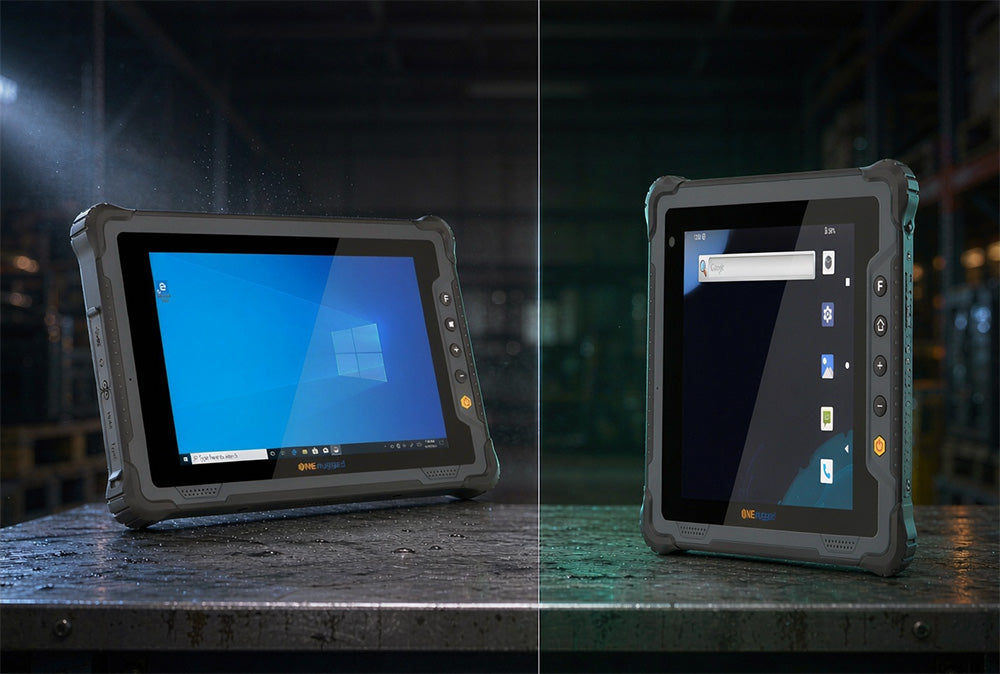
The sealed-chamber approach is worth understanding because it is counter-intuitive. ONERugged Store's M82A is an 8-inch Windows tablet running a 12th-Gen Intel Core i5-1235U or i7-1255U with a metal heat spreader, a copper heat pipe and an active fan assembly — and it carries IP67, meaning dust-tight plus temporary immersion. The sealing strategy is layered: rubber O-rings and port covers on the main chassis, a dedicated sealed chamber for the fan using an IP67-rated module to maintain the airflow path, and waterproof foam and membranes at the remaining vulnerable points.
The same device illustrates why small rugged tablets have historically been slow. Its L-shaped motherboard reduces board footprint to free internal volume for both the battery and the cooling module, and the interfaces sit directly on the board edge instead of on a separate I/O board. ONERugged Store describes the L-shaped layout as a first for its own 8-inch line; treat any broader "industry first" framing as a marketing claim until an independent teardown confirms it, and verify the design benefit — internal volume for battery and cooling — on a sample unit rather than on a datasheet.
One honest detail: the M82A is 850 g, not a featherweight, and its standard display is 550 nits with a 1,000-nit option. The 14-inch M14A also uses active cooling, at IP65. Neither choice is wrong; they are different points on the same sealing-versus-thermal curve, and the right question is which curve your mounting location requires.
How bright does a shop-floor display need to be, and will gloves work?
700 nits covers most indoor stations; 1,000 nits and above serves high-ambient areas and outdoor-adjacent mounting. Brightness is the easy part — glove and wet-hand operation has no governing standard, so it has to be demonstrated with the gloves your operators actually wear.

Three checks cover most deployments, in order of how often they cause a rollout to stall.
1. Glove and wet-hand operation. Projected-capacitive screens respond to conductive contact, and both a glove layer and a film of oil change that coupling. Ask which glove types the firmware was tuned for — thin work gloves and thick insulated gloves behave very differently — and which conditions (wet, oily, gloved-and-wet). Then insist on a demo with gloves taken from your own floor. Where the answer is unsatisfactory, physical keys and a stylus remain the reliable fallback, and both are worth specifying regardless.
2. Brightness paired with anti-reflective treatment. The nit figure alone does not predict readability. Optical bonding between the display and the cover glass removes an internal reflection layer, and an anti-reflective coating changes perceived contrast as much as another 200 nits does. A 700-nit bonded panel routinely reads better than a 1,000-nit unbonded one under the same high-bay lighting.
3. Operating temperature under battery power. Storage range is nearly always wider than operating range and tells you nothing about whether the unit will boot on a cold January morning in an unheated warehouse. Current rugged hardware publishes operating ranges around −20 °C to 60 °C, and the low end is where consumer-grade components fail first — lithium cells lose usable capacity well before the display stops working.
What are the four deployment patterns on a manufacturing floor?
Most plant computing falls into four patterns: mobile inspection, station terminals, line-side monitoring and on-device AI inspection. Each stresses a different subset of the six environmental specifications, so matching the pattern before comparing hardware prevents both over-buying and under-specifying.
The pattern decides priority order among specs. A device that spends its life in a dock does not need a 680 g body; a device carried through a plant for eight hours does not need a 17-inch panel. Getting the pattern wrong is the most expensive mistake in this category, because it is usually discovered after the mounts have been fabricated.
Mobile work and inspection
Two form factors serve this pattern, and the choice is usually about scan distance rather than screen size. The H68T is a 6.56-inch Android 14 handheld at 311 g with IP68, a 1.5 m drop rating, MIL-STD-810H, ATEX Zone 2/22, a 5,800 mAh battery rated around 17 hours and 24 minutes, and a −20 °C to 60 °C operating range. Its scan engine is a Zebra SE4710; the 10-metre read distance quoted for this platform comes from an optional long-range module, not the base configuration, which matters when the requirement is scanning labels on high racking.
Where the work is tablet-shaped rather than handheld, the M81T is an 8-inch Android 14 tablet at 680 g with a 6,000 mAh battery rated for 7 hours of 1080p playback, 700 nits, IP65, a 1.22 m drop rating and the same −20 °C to 60 °C range.
Station terminals and operator login
An all-in-one industrial computer mounted at a station exposes only its front face, which is why the front-panel rating is quoted separately from the enclosure rating. The D10R is a 10.1-inch Android station display with front-panel IP65 and NFC badge login for traceability and permission checks. When you specify one, state the cleaning method for the exposed face — the rear of the unit sits inside a cabinet and is not the sealing problem.
The choice between a panel mount touch screen PC and a tablet in a dock is a mounting decision rather than a performance one. All-in-one industrial computers have no dock to wear out and no battery to age, and their fixed viewing distance can be designed around; the cost is that the unit cannot leave the station. Where a bench is re-purposed every few months, the docked tablet wins — and where the machine behind it will still be running in five years, the industrial touchscreen panel PC does.
Line-side monitoring
This pattern punishes two things: heat and electrical noise. A continuously running display in a sealed enclosure has no convective escape path, so fanless designs win on reliability even when they lose on raw performance; there is no filter to schedule and no airflow to block. Wide voltage input matters too, because tapping a machine's 24 V rail exposes the device to sag and surge that a bench supply never shows. The P17J is a 17-inch fanless industrial touchscreen panel PC positioned for this role with electromagnetic-interference resistance and tolerance of strong vibration, and because the computer sits behind the panel there is no second enclosure to seal or ventilate.
On-device AI inspection
Running inference at the line removes the round trip to a server and keeps images on the plant network. The requirement is not a fast CPU but sustained NPU throughput with thermal headroom, because inference is a continuous load rather than a burst. The N14M is a 14-inch rugged AI PC with an Intel Core Ultra 5 125H or 7 155H and a dedicated NPU, positioned for automated optical inspection with 2D and 3D quality checks run locally. It is a notebook-class device rather than a tablet — the trade is weight and mounting hardware against sustained NPU performance.

Which ports and vehicle standards does each pattern require?
Count the ports before comparing screens. RS232 still reaches PLCs, weighing indicators, label printers and torque controllers that have no network stack of their own, and dual RJ45 reaches plant networks where Wi-Fi coverage is thin. Vehicle-mounted units need a separate standard set — ISO 7637-2 for conducted electrical transients and ISO 16750 for environmental endurance.

Serial persistence is the fact that most tablet comparisons miss. A great many machine tools, weighbridges, barcode printers and drives expose an RS232 or RS485 interface and nothing else, and the cost of bridging that to USB is a converter per device plus a new failure point in a vibrating cabinet. Check the port list against the actual equipment inventory before comparing screen sizes — the M14A, for instance, carries two RJ45 ports and one RS232 port, which is what a station that sits between a machine network and a plant network needs.
Vehicle mounting is where the standards change. A device on a forklift, tugger or AGV draws from a 12 V or 24 V rail switched by contactors and motors, and that rail produces load dump and transient spikes no bench adapter reproduces. ISO 7637-2 covers conducted electrical transients along supply lines; ISO 16750 covers environmental conditions and testing for electrical and electronic equipment in road vehicles. Both appear on the V82T vehicle computer alongside IP65 and MIL-STD-810H in trade coverage of that product; if your application is AGV-mounted, ask for the report rather than the marketing line, because the two standards address different failure mechanisms.
How do you manage a mixed Windows and Android fleet?
Android fleets provision through zero-touch or QR enrolment and are managed through an EMM/UEM console with managed Google Play; Windows fleets normally join existing Active Directory or Entra ID and are managed with Intune or the endpoint tooling already in place. The deciding factor is which console your administrators already run, not which platform is theoretically simpler.
Across multiple plants the harder problems are not enrolment but image consistency and spares. A mixed fleet without a single image standard accumulates one-off configurations that make remote support guesswork, and a spare pool sized per site instead of per fleet is either idle or short. If the platform choice itself is still open, the decision framework is covered separately in Windows vs Android Rugged Tablet.
Accessory standardisation is where a mixed fleet can win or lose. Sharing mounts, docks and chargers across both platforms requires the same chassis, not the same screen size — an 8-inch Windows tablet and an 8-inch Android tablet are frequently different physical designs. The M82A measures 236.8 x 155.8 x 21.6 mm at 850 g; the M81T measures 227.7 x 150.8 x 24.7 mm at 680 g. Their mounts are not interchangeable. Compare published dimensions, weight and mounting points before assuming one accessory inventory will serve both.
What should a manufacturing tablet specification checklist contain?
Walk the floor and answer eight questions in writing before shortlisting any hardware, then translate the answers into tender language that names a standard, a method and a report date — because "IP65" and "MIL-STD-810H" on their own cannot be compared between two vendors.
The eight questions, in the order that avoids rework:
1. What is the dust load at the mounting point? Machining, grinding and bulk transfer argue for IP6X; a clean assembly cell may not need it at all.
2. Does anything get washed down, and with what? Splash, jet or immersion, and which cleaning agents — the agent chemistry is not covered by any IP test.
3. What vibration sources sit within one metre? Presses and conveyors argue for Method 514.8 testing in the operating state, not just transit.
4. What is the measured temperature range at that spot? Measure in winter and summer, under production load, not from a building services drawing.
5. Who touches the screen, wearing what, in what condition? Bring the actual gloves to the demonstration.
6. What ports does the equipment list require? Count RS232, RJ45, USB and any fieldbus or CAN links before comparing anything else.
7. Which methods, procedures and operating states will the vendor certify in writing? Method and procedure numbers, supplied as a report, not a logo.
8. How will the fleet be enrolled, updated and repaired across sites? Console, image standard and spare pool, decided before the first unit ships.
Then write the tender line accordingly. The left column below is what most specifications say; the right column is what makes two quotes comparable.
Frequently asked questions
Is IP65 enough for a factory floor?
For general assembly and machining areas, yes — IP65 combines dust-tight sealing with protection against low-pressure water jets, which covers coolant mist and routine hose-down. Washdown lines need IP66 for powerful jets, and food, dairy and beverage areas with routine high-pressure hot cleaning need IP69K under ISO 20653.
What does "MIL-STD-810H certified" actually mean?
It means the manufacturer selected some of the standard's 29 test methods and ran them, since MIL-STD-810H is a tailoring standard and the US Department of Defense certifies no commercial products against it. Ask which methods, which procedures, and whether the device was operating during the test, then require the answers in the purchase documentation.
Fanless or fan — which survives a dusty plant longer?
Fanless, all else being equal, because there is no air path to carry dust onto a heatsink and no filter to maintain. But a sealed fan chamber is a legitimate alternative: it isolates the fan and its airflow in a dedicated IP-rated cavity, which lets a 15 W-class Windows tablet hold IP67 while still using active cooling. The unreliable design is neither of these — it is an open fan behind a filter that nobody replaces.
Do work gloves break capacitive touchscreens?
Thin work gloves usually work on modern projected-capacitive panels; thick insulated gloves often do not. No standard defines glove touch, so the only reliable answer is a demonstration with the gloves your operators wear. Where the result is marginal, physical keys and a stylus remain the dependable fallback and are worth specifying independently.
How bright does a shop-floor display need to be?
700 nits covers most indoor stations and 1,000 nits suits high-ambient or outdoor-adjacent mounting. Anti-reflective treatment and optical bonding change perceived readability as much as the nit rating does, and neither matters if the panel is mounted beyond a comfortable viewing distance from the operator.
Is a higher IP number always a better rating?
No. The two digits measure different things and are tested independently, so IP68 says nothing about jet resistance and IP69K says nothing about immersion. IP69K does not imply IP67 — the tests attack seals differently, through hot high-pressure impact versus sustained head pressure. If your process needs both, the datasheet must state both.
Can one device family cover mobile, station and line-side work?
At the accessory level only if the chassis is genuinely shared, which means matching published dimensions and mounting points rather than screen size. The computing hardware will usually differ by pattern: a carried device is optimised for weight and battery, a panel mount touch screen PC for front-panel sealing and duty cycle, a line-side display for fanless reliability and wide voltage input.
Does a rugged tablet need to be explosion-proof?
Only where a flammable atmosphere can be present — chemical, coating, fuel handling and some dust-handling areas. Those locations require ATEX or IECEx certification in addition to ingress protection, which is a separate qualification rather than a higher IP rating. The H68T handheld carries ATEX Zone 2/22 alongside IP68 and MIL-STD-810H for exactly this reason; a standard IP65 tablet does not qualify for those zones regardless of how it is housed.
What is the difference between an industrial tablet, a rugged tablet and a consumer tablet?
The terms overlap but are not interchangeable. A rugged tablet is defined by evidence — IP ratings to IEC 60529 and MIL-STD-810H test reports that name a method and a procedure. An industrial tablet adds the deployment context: fixed or vehicle mounting, RS232 and RJ45 connectivity, ATEX zoning, multi-year duty cycles and a fleet that has to be enrolled and updated. A consumer tablet in a heavy case is neither, because no third party has tested it against any of those commitments.
How much does an industrial tablet for manufacturing cost?
Cost follows sealing, testing and connectivity rather than the processor. A 14-inch Windows rugged tablet with dual RJ45, RS232, 1,000 nits and a hot-swap battery was listed at US$1,860 in 2026; 8-inch Android tablets and handhelds sit below that figure, and ATEX-certified or IP69K stainless units above it. A quote that does not name a test report, a procedure and a report date is provisional, whatever the price.
What drives industrial panel PC price?
Industrial panel PC price is set by four things, in this order: the sealing and testing behind the front-panel rating, the number and type of ports, the panel itself — size, nits and optical bonding — and the certification pack, whether that is ATEX or IECEx for a hazardous area, ISO 7637-2 for vehicle mounting, or a functional-safety rating the machine builder has to demonstrate. Two quotes for the same 15-inch screen routinely differ by a factor of two, and the gap is almost never the processor. Ask each vendor to split the quote into unit price, mounting hardware and the test reports they will supply; a vendor who cannot produce a dated report is pricing a commodity display, and should be compared on that basis.
Can an industrial touchscreen panel PC replace a legacy HMI?
Usually yes on the hardware side, and the constraint is software rather than the panel. A legacy HMI runs a proprietary runtime that will not install on Windows 11 or Android, so the industrial touchscreen panel PC either reads the existing controller over Modbus TCP, OPC UA or RS-485 and renders the screens itself, or it sits beside the original terminal purely as an MES overlay. Check three things before committing: whether the PLC exposes an Ethernet or serial path the panel PC can read without a gateway; whether the existing cut-out matches the new unit's published panel dimensions, or an adapter plate exists, because machining a cabinet door costs more than the computer; and whether the machine builder's functional-safety case depends on the HMI hardware.
Can an industrial tablet run existing factory software?
On Windows, yes: a Windows 11 Pro industrial tablet runs MES, SCADA and ERP clients, label-printing tools and Active Directory or Entra ID joined environments without repackaging the application. On Android, the constraint is usually the application rather than the hardware — Android 14 with GMS covers web, kiosk and managed-Google-Play deployment, but legacy Windows-only machine-tool software has no Android equivalent. That gap is why serial ports and Windows editions still decide a large share of line-side purchases.
Do industrial tablets work in cold stores and freezers?
Only if the operating range is stated separately from the storage range. Current rugged hardware publishes around −20 °C to 60 °C operating, and the low end is where lithium cells lose usable capacity before the display stops working. For continuous sub-zero work, verify the range at the actual temperature and ask whether low-temperature cells or battery heating are available, rather than relying on a storage figure that says nothing about whether the unit will boot.
An industrial tablet is not a consumer tablet in a stronger case — it is six environmental commitments, each of which you can require a vendor to document, method by method, before the first purchase order.
Last updated: November 13, 2026


Leave a comment
This site is protected by hCaptcha and the hCaptcha Privacy Policy and Terms of Service apply.